
Marketing

Create and send mass e-mailing campaigns without any external tool.
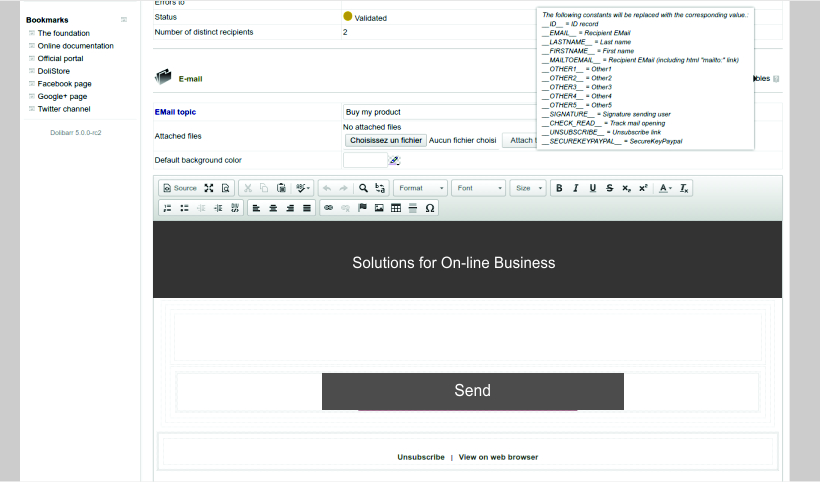
Create emailing campaigns using an easy to use WYSIWYG editor or for advanced users, an HTML editor. You can also attach files to your sent emails.
- First name, Last name, Email of recipient, signature of emailing author.
- Invisible markers to track if email is read or not.
- An easy to use links to allow recipients to unsubscribe in one
click to your mass emailing campaigns.
- And more variables depending on other modules you activated...
Select the recipients of your emailing campaign among a
list of predefined targets : You can select among any
customer, supplier, partner, employees or from an external
source. The recipients selector gives the ability to choose
mail addresses depending on a lot of criteria for an accurate
targeting.
Combine different sources if you need. The application
will automatically discard duplicated emails.
Send your email to few test emails to validate your setup with a real email reader.
Send your email campaign from the web interface
or from command line. Use your own or third party
external SMTP server.
Track sending status per recipient to know which email
was sent or not, who has opened the email and who has
decided to unsubscribe.
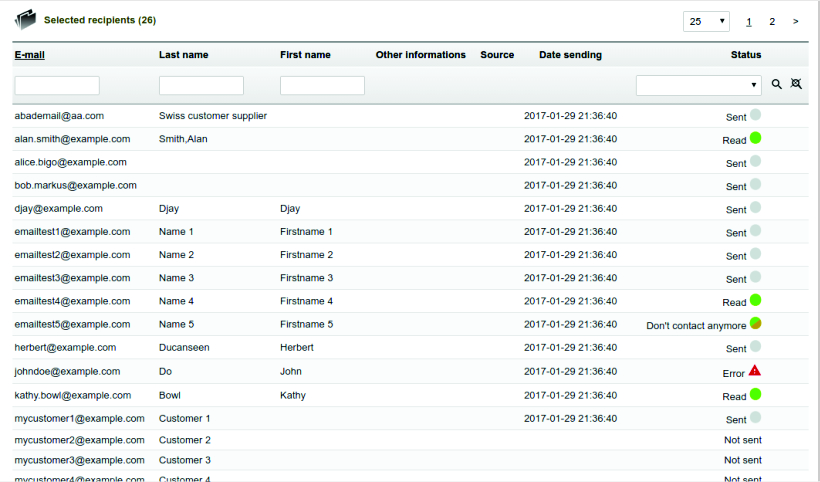
Once the e-mailing campaign is sent, the status is updated
letting you know whether the e-mails have been sent properly
or not. If all the mails have not been sent, you can retry
to send them later.
Or just duplicate your campaign, content and/or recipients
to start a new campaign in few clicks.
If you prefer using the web interface (and not only the SMTP service) of a third party E-mailing service (MailChimp, SendInBlue, SendGrid, ...), you can check if a connector is available for your version.

Marketing: Mass Emailing, Surveys & Polls.

Ask your employees or partners their choice or opinion on any topic by running a poll/survey.






We use cookies on this site to enhance your user experience.
You can learn more about our use of cookies and your choices
here.
By clicking on any link on this page or clicking
"OK, I agree, you are giving your consent for us to
set cookies."